
Quick MoinMoin on CentOS
The approach is similar to the HowTo for Ubuntu. If you would like to utilize the non-native Python 2.6, please check here.
So i have copied it and changed all neccesary things - btw here you work as root
A quick guide for setting up a first wiki on CentOS 5 or 6
Contents
About this HowTo
- MoinMoin versions
- 1.9.7
- Platforms
- CentOS 5.4 - 6.5
This tutorial will show you step by step the manual installation of a single !MoinMoin Wiki. It's as simple and quick as possible: in a few minutes, you'll be ready to enjoy and play with it 
We'll use !CentOS and !MoinMoin will use the Apache web server, with the recommended WSGI module. And don't forget: suggestions and corrections are always welcome!
Quick Installation
Install the requirements
The basic requirements for !MoinMoin 1.9 on CentOS are:
- httpd
- mod_wsgi
Install them, for example, with a
yum install httpd mod_wsgi
The last one is not included in the official repository. You have to enable the EPEL repository, compile it from Google sources or download the mod_wsgi-3.2.1-el5 rpm from suggested sites like Code Point.
Install MoinMoin
I've chosen not to use the CentOS packaged version of !MoinMoin, because it's not the latest stuff (and not for real man like we are, isn't it?). So, go to the Download section on http://moinmo.in/ and download the latest version, moin-1.9.3.tar.gz at this time. Open a Terminal shell, go to the download folder and unpack it with:
tar xvzf moin-1.9.3.tar.gz
You can find a file called docs/README_FIRST inside it for all the detailed information you should need. But for now, let's install it with the default options:
cd moin-1.9.3
python setup.py install --force --prefix /usr/local --record=install.log
Configuration files copy
cd /usr/local/share/moin
cp server/moin.wsgi .
cp config/wikiconfig.py  .
Web server configuration
vi /etc/httpd/conf/httpd.conf
and add at the end:
#
#  MoinMoin WSGI configuration
#
# you will invoke your moin wiki at the root url, like http://servername/FrontPage:
WSGIScriptAlias /   /usr/local/share/moin/moin.wsgi

# create some wsgi daemons - use user/group same as your data_dir:
WSGIDaemonProcess moin user=apache group=apache processes=5 threads=10 maximum-requests=1000 umask=0007

# use the daemons we defined above to process requests!
WSGIProcessGroup moin

# WSGISocketPrefix
WSGISocketPrefix /var/run/moin-wsgi
In case mod_wsgi is not enabled, check to verify that the following !LoadModule statement appears:
LoadModule wsgi_module modules/mod_wsgi.so
Also do not forget to allow access to the MoinMoin directory by adding the following syntax (or similar depending on your version of Apache) to your conf file:
<Directory /usr/local/share/moin>
     Order deny,allow
     Allow from all
</Directory>
Failing to add this may result in 403 Forbidden errors when attempting to access the wiki page.
Save & close the file.
This assumes that mod_wsgi has been installed on CentOS, which it might not be. If not, you might need to install it, as follows:
sudo yum install mod_wsgi
WSGI stuff
vi /usr/local/share/moin/moin.wsgi
Add this line to the end of the a1) paragraph, (your python version number may differ from the 2.6 given here):
sys.path.insert(0, '/usr/local/lib/python2.6/site-packages')
also add at the end of the a2) paragraph the line:
sys.path.insert(0, '/usr/local/share/moin')
save & close the file.
Needed security setup
cd /usr/local/share
chown -R apache:apache moin
chmod -R ug+rwX moin
chmod -R o-rwx moin
This will fix the file security of the Wiki pages, allowing only the Web server service user (apache) to be able to modify them.
For SEL compliance, carry out the following if you want moinmoin to run under enforcing mode.
semanage fcontext -a -t httpd_sys_content_t "/usr/local/share/moin(/.*)?"
restorecon -Rv /usr/local/share/moin
The first command sets all of the moin area not under the normal control of httpd to allow httpd to access it (similar to the change to allow apache to view it, above) and then applies them. This change will not be lost even if you need to issue:
touch /.autorelabel
at any point in the future.
PLEASE NOTE - The existing cache is lost upon the first restorecon, so please do it when you originally install.
Apply changes
service httpd restart
That's all for a basic Wiki! Now open the browser on http://localhost/ and you'll see the Welcome page.
Now let's make it really usable.
Basic Wiki configuration
Just the essential configuration
vi /usr/local/share/moin/wikiconfig.py
(be careful: this is a Python program and proper indentation is very important when you edit it!  ).
).
Uncomment the Welcome Front Page as:
page_front_page = u"FrontPage"
+ last but not least, give the name of the superuser like
superuser = [u"WikiAdmin", ]
save & close the file.
Apply changes
service httpd restart
Language setup
Open again the !FrontPage on http://localhost (it'll be almost empty now!). Create the !WikiAdmin user by choosing:
Login
and then:
(If you do not have an account,) you can create one now.
Be careful to obtain a "User account created! You can use this account to login now..." message after its creation . And also, remember that usernames in our environment are case sensitive  .
.
Login as !WikiAdmin and then go to http://localhost/LanguageSetup?action=language_setup
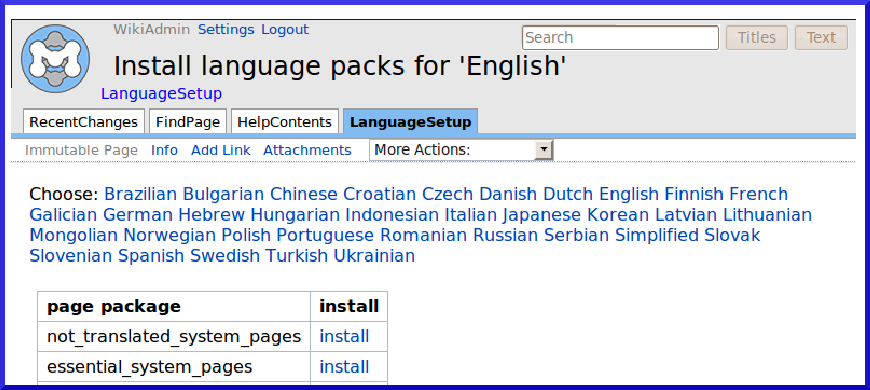
Pick up your language if different from English, then press install on the all_pages link (it's the last line in the list). You'll obtain a "Attachment 'English_all_pages.zip installed." message.
Apply last changes
service httpd restart
END
Here is the new !FrontPage, ready to be changed and enriched by you and all the users!
Quick tips
You can find some quick configuration tips here. They are not mandatory for the wiki, but I think they are the second thing you'll play with (the first one is the wiki itself, if you've wondering!).
of course, the users of your wiki cannot use http://localhost
Find the name of your machine and tell them to use an URL like http://mywikiserver if you don't want (or cannot) use the wiki on the virtual root of your Web server, you simply have to change WSGIScriptAlias parameter on apache2.conf and edit in wikiconfig.py url_prefix_static with the new path:
vi /etc/httpd/conf/httpd.conf
- Setup your alias:
WSGIScriptAlias /mywiki /usr/local/share/moin/moin.wsgi
Open wikiconfig.py:
vi /usr/local/share/moin/wikiconfig.py
- Then uncomment and edit url_prefix_static adding the new path:
url_prefix_static = '/mywiki' + url_prefix_static
- Now restart apache:
service httpd restart
In this way, your wiki will be alive on http://mywikiserver/mywiki
your Wiki does not still have a name. As a consequence the browser will show an ugly "Untitled Wiki" message on the top bar. In order to change it, just modify the sitename parameter on wikiconfig.py.
- configure the Mail section on wikiconfig.py. Your users will be able to use the password reset feature and will be informed of changes on subscribed pages.
- you'll probably have to change the default time zone. In wikiconfig.py, add a line like:
tz_offset = 1.0 # default time zone offset in hours from UTC